

Best SEO Plugins for WordPress: Which One Actually Helps Your Site Rank?
Choosing the Best SEO Plugins for WordPress is no longer just about adding meta titles or generating XML sitemaps. Modern SEO plugins affect page speed, schema markup, indexing, AI content optimization, WooCommerce visibility, redirects, and even how Google understands your content structure.
The problem is that many WordPress users install the wrong plugin combination. Some overload the site with unnecessary modules. Others create conflicts that break schema, slow down performance, or generate duplicate metadata.
If you want better rankings without damaging your site performance, this guide compares the SEO plugins that actually work in real WordPress environments.
Some are better for beginners. Others are ideal for affiliate sites, WooCommerce stores, agencies, or advanced SEO workflows.

Why Your SEO Plugin Matters More Than Most People Think
A good SEO plugin does far more than insert keywords.
It helps WordPress generate cleaner code, improve crawlability, manage indexing rules, create structured data, fix broken links, and optimize how pages appear in search results.
A bad plugin, however, can create serious issues:
- Duplicate schema markup
- Slow admin dashboard
- Indexing conflicts
- Redirect loops
- Broken Open Graph tags
- Massive database bloat
- Compatibility issues after updates
This is why experienced WordPress users rarely install SEO plugins blindly.
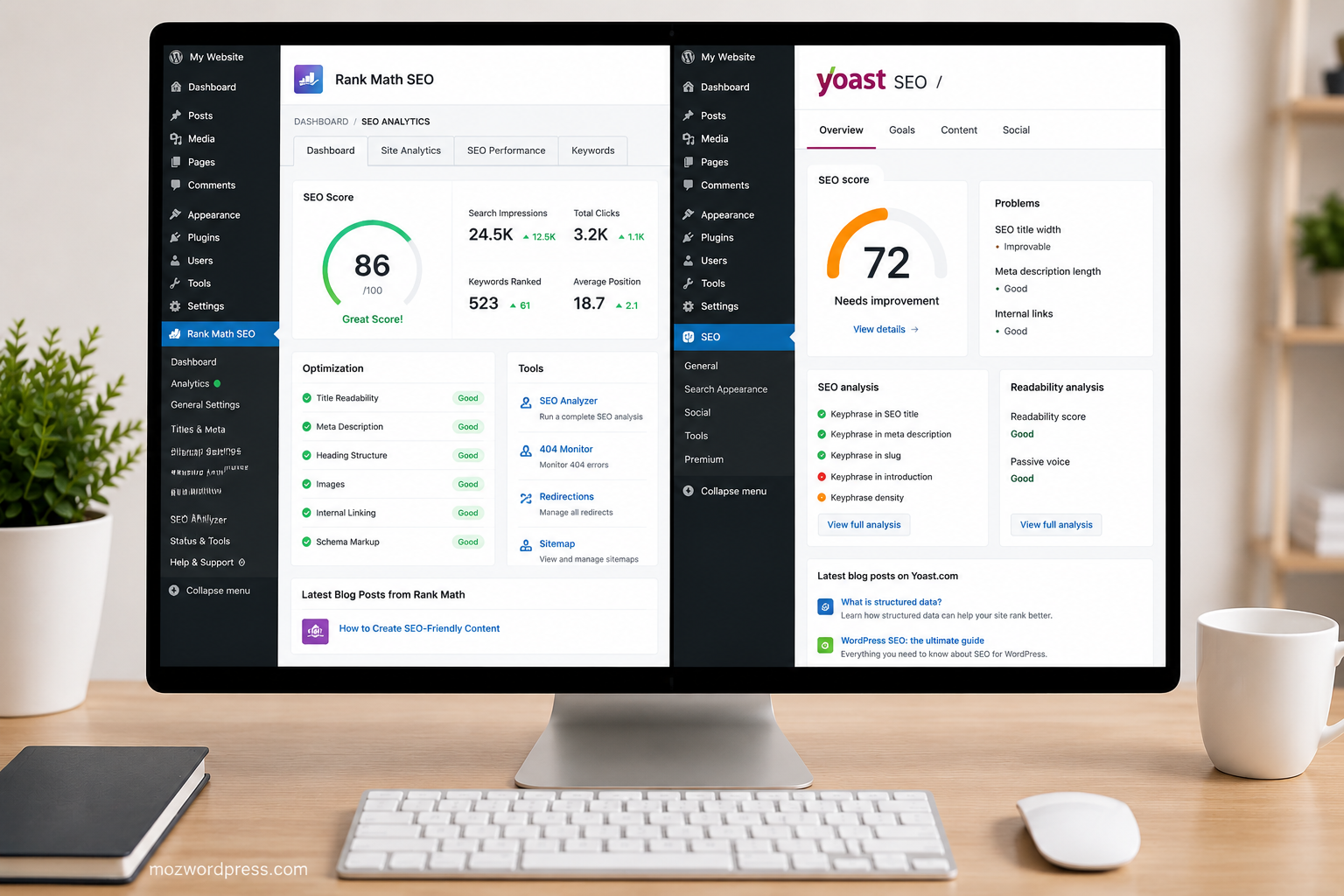
1. Rank Math — Best Overall SEO Plugin for Most WordPress Sites
If you want a balance between performance, advanced features, and usability, Rank Math is currently one of the strongest choices available.
Unlike older SEO plugins that require multiple add-ons, Rank Math includes most advanced SEO tools directly inside the core plugin.
What Makes Rank Math Stand Out
- Built-in schema generator
- Keyword optimization analysis
- Google Search Console integration
- Redirection manager
- 404 monitoring
- WooCommerce SEO support
- AI content suggestions
- Lightweight modular system
One reason many WordPress professionals migrated from Yoast SEO to Rank Math is performance efficiency. You can disable modules you do not use, which helps reduce backend clutter.
For affiliate marketers and content-heavy blogs, the built-in schema features are extremely useful because they eliminate the need for multiple extra plugins.
Best For
- Bloggers
- Affiliate marketers
- Content publishers
- WooCommerce stores
- Advanced beginners
Potential Downsides
The interface contains many options. Beginners may initially feel overwhelmed by the amount of settings available.
Internal Link Suggestion:
- Read our guide on improving WordPress speed optimization
- Learn how to fix common WordPress plugin conflicts
2. Yoast SEO — Reliable and Beginner Friendly
Yoast SEO remains one of the most installed WordPress SEO plugins for a reason.
It is stable, beginner-friendly, and integrates well with most themes and page builders.
The real advantage of Yoast is simplicity. Many users who do not want advanced configurations prefer it because the interface is easier to understand.
Strong Features
- Readability analysis
- XML sitemap generation
- Easy meta title editing
- Breadcrumb support
- Canonical URL management
- Strong documentation
Where Yoast Falls Behind
Some advanced SEO features require premium upgrades. Compared to Rank Math, the free version feels more limited today.
On large WordPress sites, some users also report heavier backend resource usage.
Still, if simplicity matters more than advanced automation, Yoast remains a safe option.
3. All in One SEO (AIOSEO) — Strong Alternative for Business Websites
AIOSEO has improved significantly over the last few years.
It is now a polished SEO plugin with strong WooCommerce support, local SEO tools, and excellent setup guidance for beginners.
Best Features
- Local SEO optimization
- Smart schema generation
- SEO audit checklist
- Social media integration
- WooCommerce SEO tools
- Redirect manager
This plugin works particularly well for:
- Local businesses
- Agency websites
- Small company websites
- Service-based WordPress sites
One advantage is that the setup wizard helps prevent configuration mistakes that many beginners make.
4. SEOPress — Lightweight and Clean
Many advanced WordPress developers prefer SEOPress because it avoids unnecessary bloat.
The interface is cleaner than some competitors, and the plugin integrates well with custom WordPress setups.
Why Developers Like SEOPress
- No ads in dashboard
- White-label support
- Lightweight structure
- Good schema tools
- Simple interface
- Competitive pricing
If you manage client sites or multiple WordPress installations, SEOPress can be extremely practical.
It is especially popular among freelancers who want more control and fewer distractions.
5. The SEO Framework — Best Minimal SEO Plugin
Some WordPress users want SEO improvements without constant notifications, upsells, or complex dashboards.
That is where The SEO Framework performs well.
It focuses on automation and clean optimization instead of feature overload.
Ideal Use Cases
- Lightweight blogs
- Portfolio websites
- Minimalist WordPress builds
- Performance-focused projects
The plugin automatically configures many SEO settings intelligently, which reduces maintenance work.
However, power users may find the advanced feature set limited compared to Rank Math or AIOSEO.
Best SEO Plugins for WordPress for WooCommerce
WooCommerce websites require additional SEO considerations:
- Product schema
- Category indexing
- Filter URL management
- Rich snippets
- Product metadata optimization
For WooCommerce specifically, these plugins perform best:
Rank Math
Excellent schema support and product optimization tools.
AIOSEO
Very beginner-friendly for WooCommerce store owners.
Yoast WooCommerce SEO
Good option but requires additional paid extension.
If your store contains hundreds or thousands of products, performance should become part of your decision.
Heavy plugins can slow down admin product editing considerably.
Common SEO Plugin Mistakes That Hurt Rankings
Many site owners install SEO plugins incorrectly.
Here are some real problems commonly seen on WordPress sites.
Running Multiple SEO Plugins Together
Never run multiple full SEO plugins simultaneously.
Using Rank Math together with Yoast or AIOSEO often creates:
- Duplicate meta tags
- Conflicting schema
- Indexing errors
- Broken social previews
Always keep only one primary SEO plugin active.
Ignoring Schema Conflicts
Many themes already inject schema markup.
Adding another aggressive schema plugin may create duplicate structured data warnings inside Google Search Console.
Always test schema after activation.
You can validate structured data using Google’s official tool:
Installing Too Many SEO Add-ons
Some users install:
- SEO plugin
- Schema plugin
- Redirect plugin
- Open Graph plugin
- Sitemap plugin
- Breadcrumb plugin
Even though one good SEO plugin already handles everything.
This creates unnecessary complexity and increases the chance of conflicts.
Which SEO Plugin Is Fastest?
Performance matters for SEO.
A heavy plugin can affect:
- Dashboard speed
- Page generation time
- Database queries
- Crawl efficiency
Based on practical WordPress usage, these plugins generally perform well:
| Plugin | Performance |
|---|---|
| Rank Math | Very Good |
| SEOPress | Excellent |
| The SEO Framework | Excellent |
| Yoast SEO | Moderate |
| AIOSEO | Good |
Actual speed also depends heavily on:
- Hosting quality
- Theme optimization
- Number of active plugins
- Caching setup
Best SEO Plugins for WordPress for Beginners
If you are new to WordPress SEO, these are easier to manage:
Best Beginner Choice
Yoast SEO
Simple interface and extensive tutorials.
Best Beginner + Growth Option
Rank Math
More advanced long-term potential while still beginner accessible.
Best Lightweight Beginner Option
The SEO Framework
Minimal configuration required.
How to Choose the Right SEO Plugin
The best plugin depends on your website goals.
Choose Rank Math If You:
- Want advanced features
- Run affiliate content
- Need schema flexibility
- Want fewer extra plugins
Choose Yoast If You:
- Prefer simplicity
- Want stability
- Need easy onboarding
Choose AIOSEO If You:
- Run a business website
- Need local SEO
- Want guided configuration
Choose SEOPress If You:
- Manage client websites
- Prefer cleaner dashboards
- Want lightweight customization
Choose The SEO Framework If You:
- Prioritize performance
- Want automation
- Hate plugin bloat
Final Verdict
There is no universal SEO plugin perfect for every WordPress site.
But for most modern WordPress users, Rank Math currently offers the strongest balance between features, performance, automation, and scalability.
That said, the smartest decision is choosing a plugin that matches your workflow instead of blindly following popularity.
A lightweight blog may benefit more from The SEO Framework.
A local business site may perform better with AIOSEO.
A beginner may feel more comfortable using Yoast.
The important thing is avoiding plugin conflicts, keeping your setup clean, and focusing on content quality alongside technical SEO.
Without good content, even the best SEO plugin cannot save weak rankings.
External Resource
Official WordPress Plugin Directory:
https://wordpress.org/plugins/

