
WordPress Beginner Guide: 12 Essential Steps to Build Your First Site in 2026
Starting a website with WordPress in 2026 is easier than ever, but beginners still make the same expensive mistakes: choosing bad hosting, installing too many plugins, ignoring backups, and using bloated themes that slow everything down.
This WordPress Beginner Guide walks through the exact process used by freelancers, bloggers, and small businesses to launch a clean, fast, secure WordPress site without turning it into a technical nightmare later.
Whether you want to build a blog, company website, affiliate site, portfolio, or online store, the fundamentals below will save you hours of frustration.
Why WordPress Still Dominates in 2026
WordPress.org continues to power a huge portion of the internet because it gives users full ownership and flexibility.
Unlike closed platforms, WordPress allows you to:
• Install custom themes
• Add plugins for almost any feature
• Improve SEO with advanced tools
• Monetize with ads or affiliate marketing
• Scale from a simple blog to a large business website
The biggest advantage is control. You are not locked into a single provider.
For beginners, that matters more than most people realize.
Step 1: Choose the Right Hosting First
Most WordPress problems actually start with poor hosting.
Cheap hosting may look attractive, but overloaded servers often create:
• Slow loading times
• Plugin conflicts
• Random downtime
• Database connection errors
• Failed updates
• Security vulnerabilities
For beginners, managed WordPress hosting is usually the safest option because many technical tasks are automated.
Look for hosting that includes:
• Free SSL certificate
• Daily backups
• One-click WordPress installation
• Malware scanning
• Good support response time
• SSD or NVMe storage
Avoid choosing hosting based only on price.
A slow website damages SEO, user experience, and AdSense revenue potential.
Step 2: Install WordPress Properly
Most hosting providers now offer one-click installation.
During setup:
• Use a strong admin password
• Avoid using “admin” as username
• Enable HTTPS immediately
• Choose your site language carefully
• Set your timezone correctly
After installation, go directly to:
Settings → Permalinks
Choose:
Post Name
This creates cleaner SEO-friendly URLs.
Bad URL:
yourdomain.com/?p=123
Good URL:
yourdomain.com/how-to-install-wordpress
This single change improves readability and search engine indexing.
Step 3: Pick a Lightweight Theme
One of the biggest beginner mistakes is installing flashy themes overloaded with unnecessary features.
Heavy themes usually create:
• Slow page speed
• Layout problems
• Mobile issues
• Plugin conflicts
A lightweight theme is faster, easier to customize, and better for SEO.
Good beginner-friendly themes include:
• Astra
• GeneratePress
• Kadence
• Blocksy
These themes work well with the default WordPress editor and popular page builders.
Before activating any theme, test:
• Mobile responsiveness
• Demo speed
• Update frequency
• Plugin compatibility
Step 4: Install Only Essential Plugins
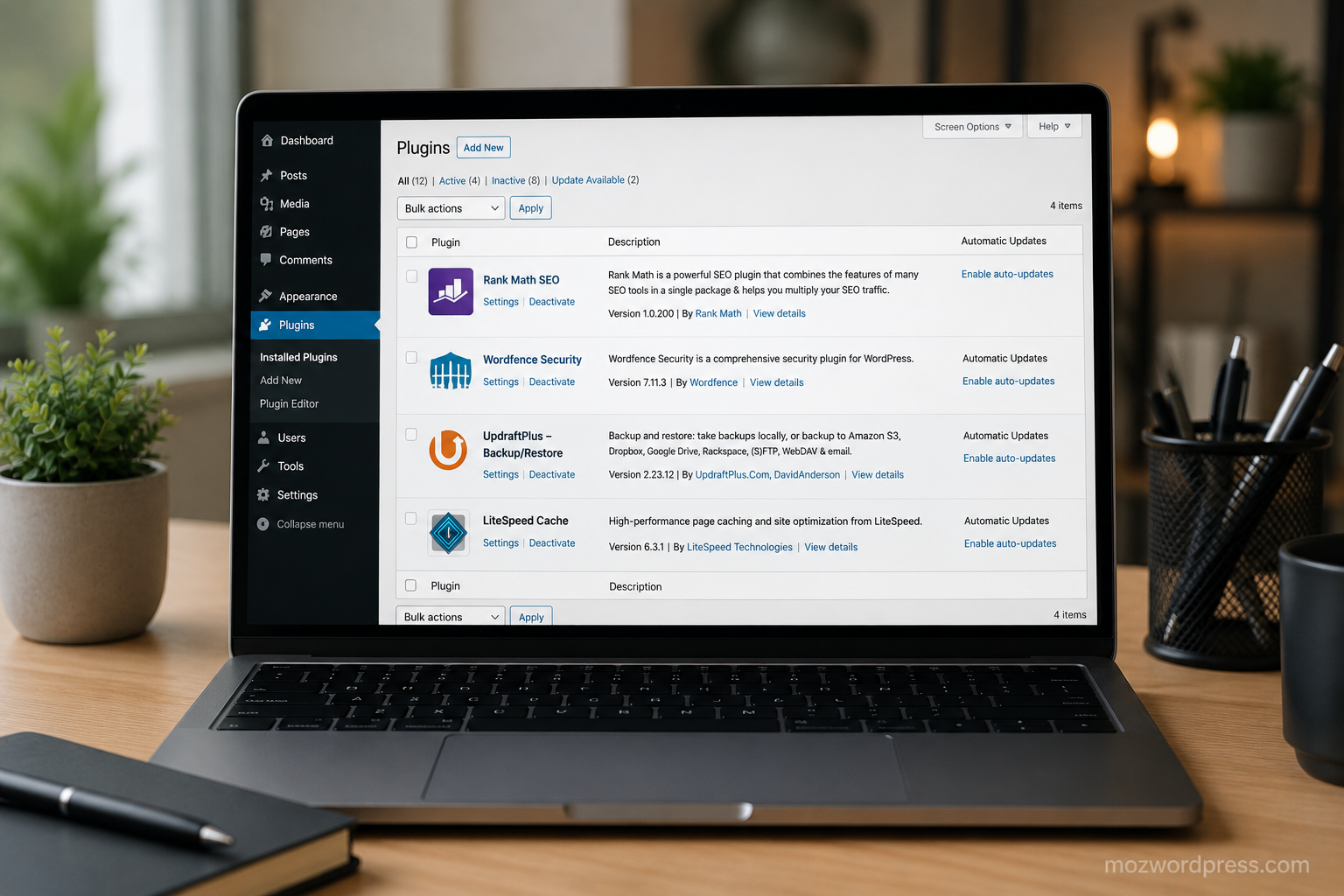
Plugins are powerful, but too many plugins can destroy performance.
A clean WordPress setup usually needs only a few essentials.
Recommended Starter Plugins
SEO Plugin
Rank Math SEO is beginner-friendly and includes:
• XML sitemaps
• Schema support
• SEO analysis
• Redirection tools
• Content optimization
Security Plugin
Use one security plugin only.
Good options:
• Wordfence
• Solid Security
• Sucuri
Backup Plugin
Never skip backups.
Recommended:
• UpdraftPlus
• All-in-One WP Migration
Cache Plugin
Caching improves speed dramatically.
Popular choices:
• LiteSpeed Cache
• WP Rocket
• W3 Total Cache
Avoid installing multiple plugins that do the same job.
That creates conflicts and unnecessary database load.
Step 5: Configure Basic WordPress Settings
Many beginners ignore core settings after installation.
That becomes a problem later.
Important Settings to Configure
Reading Settings
Disable search engine indexing only if your site is still under development.
Discussion Settings
Turn off spam-heavy comment options.
Media Settings
Avoid uploading oversized images.
User Roles
Never give Administrator access to everyone.
These small settings improve security and site stability immediately.
Step 6: Learn the Difference Between Posts and Pages
This confuses many beginners.
Posts
Use for:
• Blog articles
• News updates
• Tutorials
• Time-based content
Pages
Use for:
• About page
• Contact page
• Services
• Privacy policy
Understanding this structure helps both SEO and navigation.
Step 7: Build a Clean Site Structure
A messy structure hurts rankings and user retention.
Your navigation should stay simple.
Recommended Core Pages
• Home
• Blog
• About
• Contact
• Privacy Policy
If you plan to monetize with affiliate marketing or AdSense, also create:
• Disclaimer page
• Terms and Conditions
• Affiliate Disclosure
This improves trust and compliance.
Step 8: Optimize Your Site for Speed
Speed directly affects:
• SEO rankings
• Bounce rate
• Ad revenue
• Conversion rate
Many WordPress sites become slow because beginners:
• Upload huge images
• Use heavy sliders
• Install unnecessary plugins
• Ignore caching
Quick Speed Improvements
• Compress images before upload
• Use WebP images
• Enable caching
• Use a CDN if traffic grows
• Avoid autoplay videos
You can test your website using:
Do not obsess over getting a perfect 100 score.
Real-world usability matters more.
Step 9: Secure Your WordPress Website
WordPress itself is secure, but neglected sites become targets quickly.
Basic Security Checklist
• Keep WordPress updated
• Update plugins regularly
• Remove unused themes/plugins
• Use strong passwords
• Enable two-factor authentication
• Limit login attempts
Never download nulled themes or cracked plugins.
Many contain hidden malware, spam injections, or backdoors.
This is one of the fastest ways to destroy a website.
Step 10: Understand WordPress Backups Before Disaster Happens
Most beginners care about backups only after losing their website.
That is too late.
A proper backup system should include:
• Automatic daily backups
• Offsite storage
• Database backups
• Restore testing
Before updating plugins or themes, create a manual backup.
Major updates sometimes break layouts or functionality.
Step 11: Start Learning Basic SEO Early
SEO is easier when implemented from the beginning.
A good WordPress Beginner Guide must include this because many sites fail due to poor structure rather than poor content.
Beginner SEO Priorities
Use Clear Headlines
Every article should have:
• One H1
• Organized H2s and H3s
• Readable formatting
Optimize Images
Use descriptive ALT text.
Write Helpful Content
Search engines reward content that solves problems clearly.
Internal Linking
Link related articles naturally.
Example:
You can internally link to tutorials like:
• “How to Speed Up WordPress”
• “Best WordPress Plugins for Beginners”
• “How to Fix WordPress White Screen Errors”
This improves retention and crawlability.
Step 12: Avoid Common Beginner Mistakes
Installing Too Many Plugins
More plugins do not automatically improve a site.
Ignoring Updates
Outdated plugins are one of the biggest security risks.
Using Weak Passwords
Brute-force attacks still happen constantly.
Choosing Bad Themes
Poorly coded themes create long-term problems.
Publishing Thin Content
Low-quality articles rarely rank in 2026.
Skipping Mobile Optimization
Most traffic now comes from mobile devices.
Always test your site on phones and tablets.
What Beginners Should Learn Next
Once your website is stable, focus on:
• SEO optimization
• Email marketing
• Website monetization
• Performance optimization
• Affiliate marketing
• WordPress troubleshooting
The learning curve becomes easier after the first successful setup.
Most advanced WordPress users started exactly where beginners are now: confused by plugins, themes, hosting dashboards, and random errors.
The difference is consistency.
Final Thoughts on This WordPress Beginner Guide
A successful WordPress website in 2026 is not about installing hundreds of tools or copying flashy designs.
It is about creating a stable foundation:
• Reliable hosting
• Lightweight themes
• Essential plugins only
• Good security practices
• Fast loading pages
• Useful content
If you get these fundamentals right early, your website becomes much easier to grow, monetize, and maintain.
That is what separates a professional WordPress site from the thousands of abandoned websites that break after a few months.

