


Rank Math Content AI Setup: Step-by-Step Guide for 2026
If you're serious about creating SEO-optimized content faster in WordPress, Rank Math's Content AI is one of the most practical tools available. I've used it on dozens of sites — from affiliate blogs to client projects — and it consistently helps turn rough drafts into well-structured, competitive pieces without the usual guesswork.
Here's exactly how to set it up and start using it effectively.
1. Install and Activate Rank Math SEO
Go to your WordPress dashboard → Plugins → Add New. Search for “Rank Math SEO“, install it, and activate.
This is the foundation. Content AI lives inside the main plugin — no separate installation needed.
2. Connect Your Rank Math Account
After activation, Rank Math will prompt you to connect a free account. Click Connect Your Account.
- If you don’t have one, register with your email (or Google/Facebook).
- Confirm the activation.
This step is mandatory. It links your site to your usage credits and unlocks AI features. Without it, Content AI remains limited or unavailable.
Pro tip: Enable usage tracking if you're comfortable — it helps Rank Math improve the tool without sharing sensitive data.
3. Enable the Content AI Module
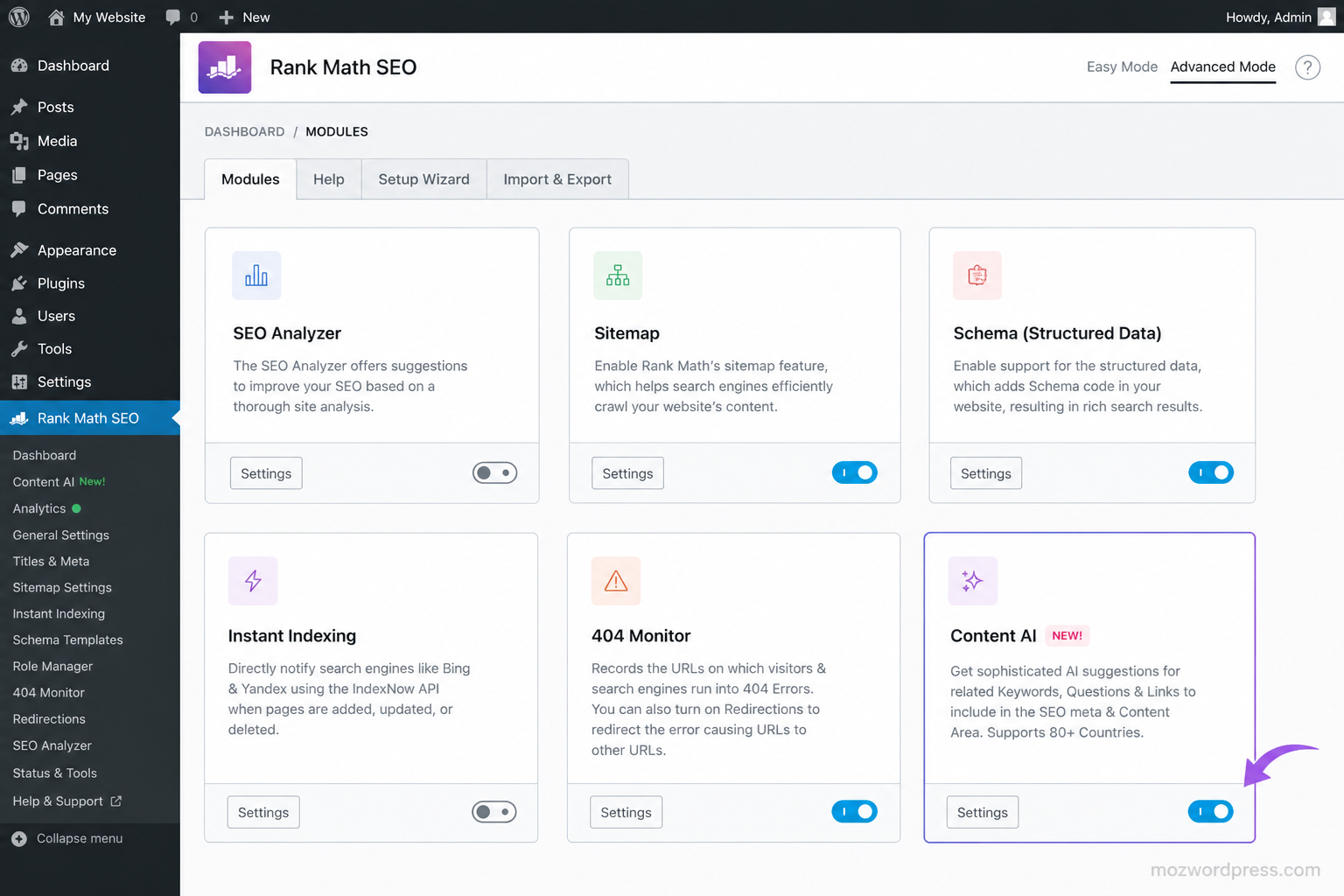
Navigate to Rank Math SEO → Dashboard → Modules. Find Content AI in the list and toggle it On.
Once enabled, you’ll see a Settings button. Click it or go directly to Rank Math SEO → General Settings → Content AI for configuration.
4. Choose and Activate Your Content AI Plan
Content AI uses a credit system:
- Free users: Limited credits (typically 750/month) for basic features.
- Paid plans (Starter, Creator, Expert): More credits, advanced tools, and higher monthly limits.
Go to your Rank Math account dashboard or the plugin to check/upgrade your plan. Credits refresh monthly — unused ones don’t roll over, so use them consistently.
Rank Math Pro users often get bonus trial credits, but Content AI is a separate subscription.
5. Configure Content AI Settings
In General Settings → Content AI, review these key options:
- Default Language & Tone — Match your audience (e.g., professional, conversational).
- Target Audience — Helps the AI tailor suggestions.
- Writing Style — Set preferences for headings, paragraph length, etc.
- Credit Usage Alerts — Enable notifications so you don’t run out mid-project.
Spend 5–10 minutes here. Proper defaults save credits later by reducing revisions.
6. Start Using Content AI in the Editor
Open any post or page. In the Rank Math metabox (usually on the right or below the editor), you’ll now see the Content AI tab.
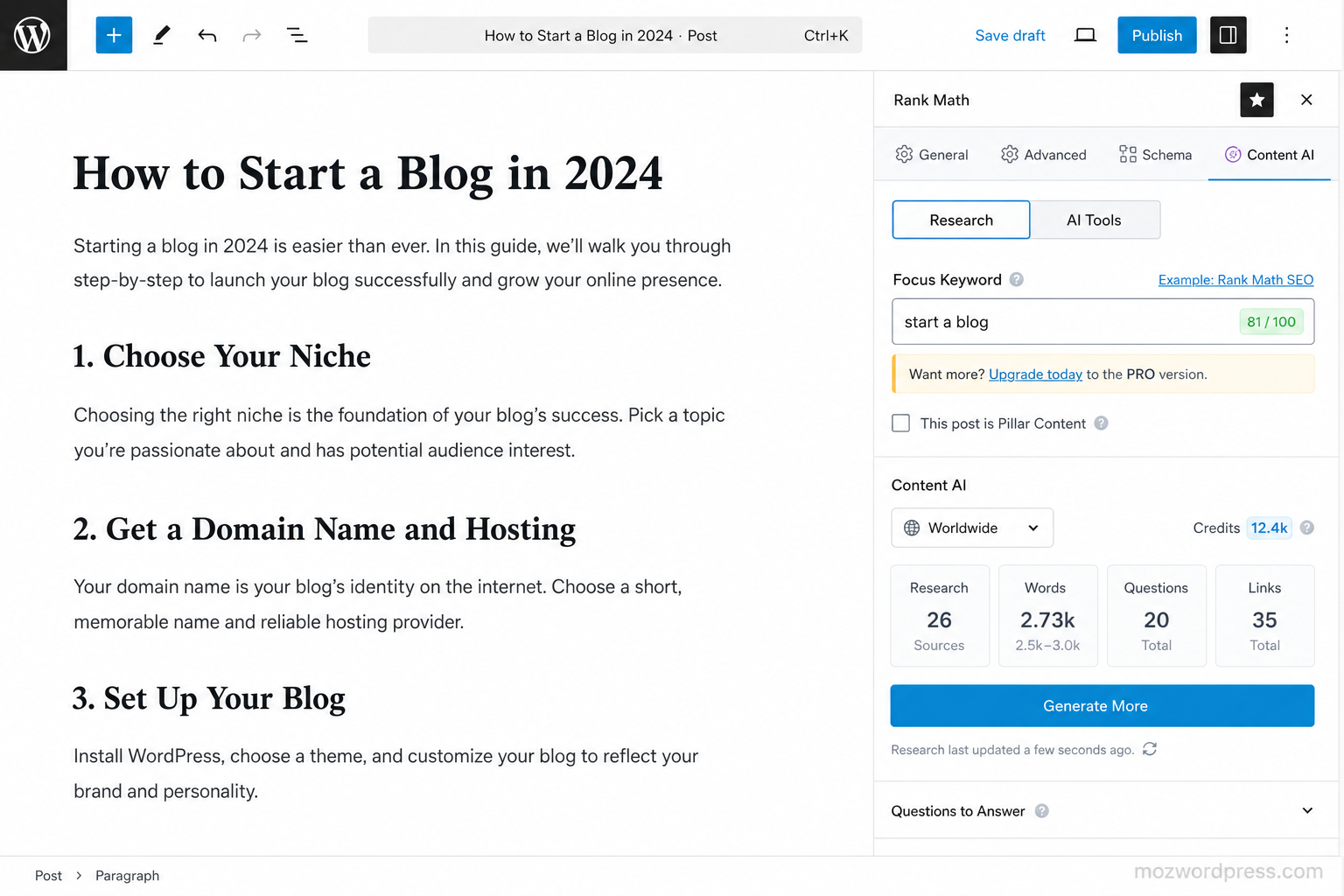
Key features you can use immediately:
- Research: Enter your focus keyword. Get competitor insights, related questions, keyword ideas, and content gaps. This uses more credits but stores data on your server for reuse.
- AI Writing Tools: Generate introductions, outlines, full paragraphs, conclusions, FAQs, or meta descriptions.
- Optimization Suggestions: Real-time advice on headings, word count, links, and readability based on top-ranking pages.
- RankBot: Conversational AI assistant inside the editor.
In Gutenberg (or supported builders like Elementor), you can highlight text and use inline AI commands for rewrite, expand, summarize, or fix grammar.
Best Practices for Efficient Credit Use
- Research high-value keywords first — the data persists.
- Generate outlines and key sections, then write/edit manually for authenticity.
- Use bulk tools for titles and descriptions when optimizing multiple posts.
- Always review AI output. It’s a strong starting point, not final copy.
I’ve found that combining Content AI research with manual expertise produces better results than pure AI generation.
Troubleshooting Common Setup Issues
- Content AI not showing? Double-check the module is enabled and your account is connected. Clear cache and refresh.
- Credit errors? Verify your subscription status in your Rank Math account.
- Slow performance? Content AI is lightweight, but ensure your hosting handles AI calls (most modern hosts do fine in 2026).
For official details, see Rank Math’s guide: How to Get Started With Content AI.
Final Thoughts
Setting up Rank Math Content AI takes under 10 minutes but can cut your content creation time significantly while improving on-page SEO. It’s not magic — you still need strategy and editing — but it removes the tedious research and initial drafting.
Start with one well-researched post using the full workflow. You’ll quickly see why it’s a staple in my 2026 plugin stack.
Have questions about integrating it with specific page builders or workflows? Drop them in the comments.

