

Common WordPress Mistakes Beginners Make is not just theory. In real projects, these errors show up every day when setting up blogs, business websites, or affiliate platforms. Most beginners don’t realize how small decisions early on can affect speed, SEO rankings, security, and even revenue.
What usually happens is simple: a user installs WordPress, adds a theme, installs a few plugins, and expects everything to work smoothly. But behind the scenes, hidden mistakes start building up technical debt that becomes harder to fix later.
This guide breaks down the most common WordPress mistakes beginners make based on real site issues, not theory. Each point includes practical fixes you can apply immediately.
Common WordPress Mistakes Beginners Make When Setting Up Their Site
The setup stage is where most long-term problems begin.
1. Leaving Default Settings Unchanged
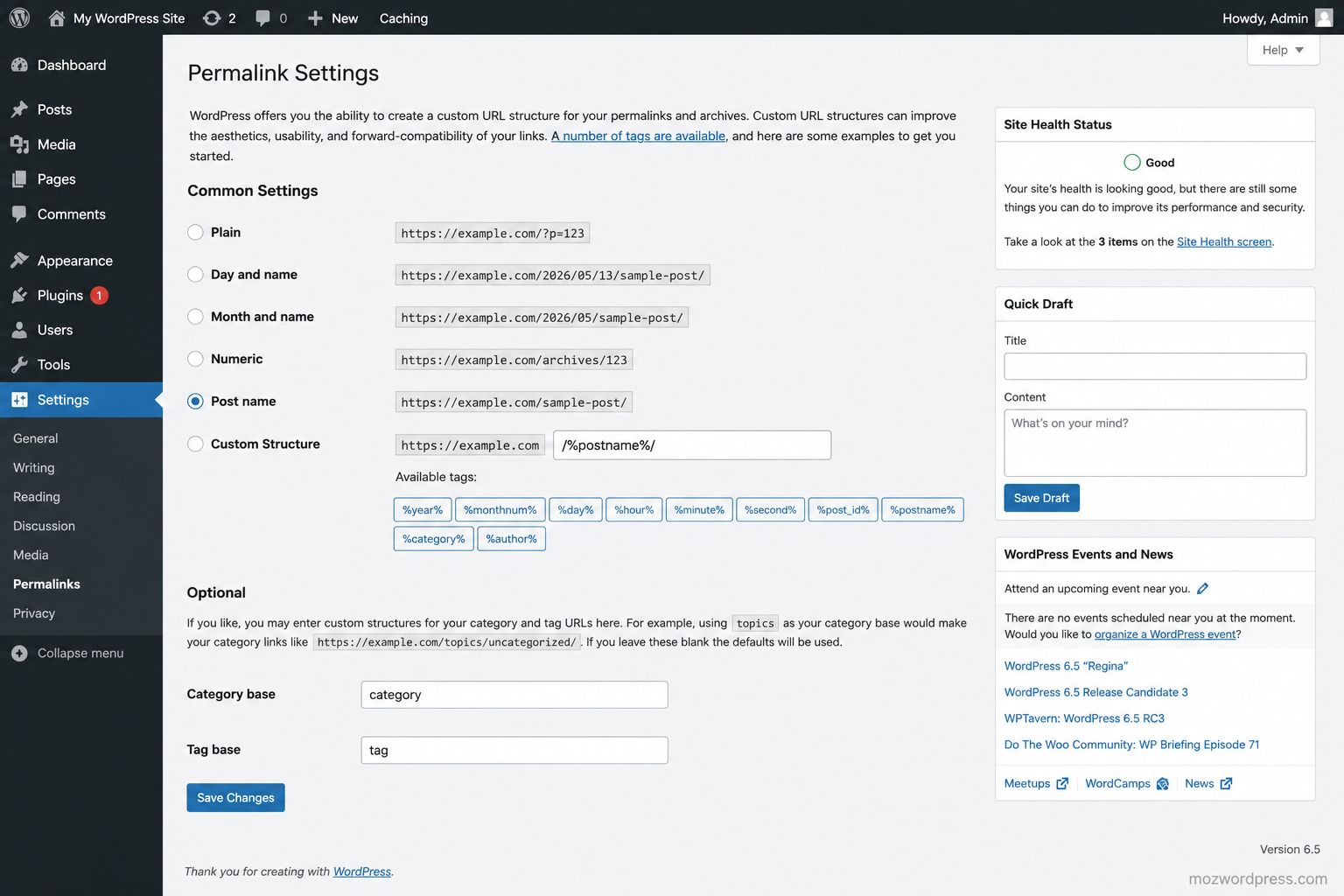
One of the most overlooked issues is keeping default WordPress settings. Things like default permalink structure, admin username, or timezone are often ignored.
For example:
- Using
?p=123instead of SEO-friendly URLs - Leaving “admin” as username
- Wrong time zone affecting scheduling posts
Fix it early:
- Go to Settings → Permalinks → choose “Post name”
- Create a unique admin username
- Set correct time zone
2. Ignoring Hosting Quality
Many beginners choose the cheapest hosting without checking performance or support. This leads to slow loading times and downtime issues later.
A good hosting provider directly affects SEO rankings and user experience.
If you are serious about scaling a WordPress site, choose hosting that supports caching, PHP 8+, and solid uptime.
Internal reading suggestion:
/wordpress-speed-optimization
3. Not Installing a Backup System
Another classic mistake in Common WordPress Mistakes Beginners Make is ignoring backups completely.
When something breaks, users panic because nothing is recoverable.
Use:
- Automated daily backups
- Cloud storage (Google Drive or external server)
A good reference for backup strategies can be found here:
https://wordpress.org/support/article/wordpress-backups/
Common WordPress Mistakes Beginners Make With Themes and Plugins
This is where most sites start to break silently.
4. Installing Too Many Plugins
Plugins are powerful, but beginners often install everything without thinking.
Problems caused:
- Site slowdown
- Plugin conflicts
- Security risks
Rule of thumb:
If a plugin is not actively solving a problem, remove it.
5. Using Nulled or Untrusted Themes
This is a dangerous habit. Free “premium themes” from unofficial sources often contain malware or hidden scripts.
A clean theme from trusted sources is always safer than a “premium cracked version.”
6. Ignoring Plugin Updates
Outdated plugins are one of the top causes of hacked WordPress sites. Updates are not optional.
Enable auto-updates only for trusted plugins and always test major updates on a staging site if possible.
Internal link idea:
/wordpress-security-guide
Security and Backup Common WordPress Mistakes Beginners Make
Security is often ignored until something goes wrong.
7. Weak Login Protection
Using weak passwords or not limiting login attempts makes brute force attacks easy.
Fix:
- Use strong passwords
- Enable two-factor authentication
- Limit login attempts
8. No Firewall or Security Plugin
A proper security layer blocks suspicious traffic before it reaches your site.
Even basic setups should include:
- Login protection
- Malware scanning
- Firewall rules
9. Forgetting Regular Backups
Yes, backups appear again here because this is one of the most repeated Common WordPress Mistakes Beginners Make.
Without backups, one attack or crash can erase months of work.
Performance and Speed Common WordPress Mistakes Beginners Make

Speed is not optional anymore. It affects SEO, conversions, and AdSense revenue.
10. Uploading Large Images Without Optimization
Unoptimized images are one of the biggest hidden performance killers.
Fix:
- Compress images before upload
- Use WebP format
- Avoid uploading 5MB images directly from a camera
11. Not Using Caching
Without caching, WordPress generates pages dynamically every time, slowing everything down.
Caching plugins reduce server load and improve load time significantly.
12. Ignoring Database Cleanup
Over time, WordPress stores revisions, spam comments, and unused data.
Cleaning your database improves performance and reduces loading delays.
SEO and Content Strategy Mistakes That Hurt Growth
Even if your site is technically perfect, content mistakes can block growth.
13. Poor Permalink Structure
Long or messy URLs reduce click-through rates and SEO performance.
Use clean URLs like:
yourdomain.com/wordpress-tips instead of random strings.
14. No Internal Linking Strategy
Beginners often publish posts without connecting them.
Internal links help:
- Keep users longer on site
- Improve SEO structure
- Distribute page authority
Example internal structure:
- /wordpress-security-guide
- /wordpress-speed-optimization
- /best-wordpress-plugins
15. Writing Without Keyword Intent
Content that ignores search intent rarely ranks.
Each post should answer a specific problem clearly, not just talk around it.
Practical Reality Behind These Mistakes
Most Common WordPress Mistakes Beginners Make are not technical failures. They are decision failures made early in the setup process.
Fixing them later is possible, but it always costs more time and effort.
The best approach is simple:
Build clean from day one, keep plugins minimal, focus on speed, and secure everything early.
External Resource
For deeper technical documentation and official guidance:
https://wordpress.org/support/

