
Best WordPress Themes for Any Website: 12 Fast & Flexible Picks for 2026
Choosing the best WordPress themes in 2026 is no longer just about design. Speed, SEO structure, mobile optimization, WooCommerce compatibility, and long-term support matter more than flashy demos.
A slow or poorly coded theme can hurt rankings, increase bounce rates, and create plugin conflicts that are difficult to troubleshoot later. On the other hand, a lightweight and well-supported theme gives you a stable foundation for SEO, monetization, affiliate marketing, and user experience.
This guide covers practical theme recommendations based on real-world use cases, not marketing hype. Whether you are building a blog, business website, online store, portfolio, or affiliate site, these themes consistently perform well on modern WordPress setups.
What Makes the Best WordPress Themes in 2026?
Before downloading any theme, check these essentials:
- Fast loading speed
- Clean code structure
- Mobile responsiveness
- Compatibility with popular plugins
- SEO-friendly markup
- Frequent updates
- WooCommerce support
- Good documentation
- Low dependency on heavy page builders
Many themes look impressive in demos but become difficult to manage after installing multiple plugins. A reliable theme should stay fast even after adding SEO plugins, caching tools, forms, and affiliate integrations.
If you plan to monetize your site, prioritize themes optimized for Core Web Vitals and conversion-focused layouts.
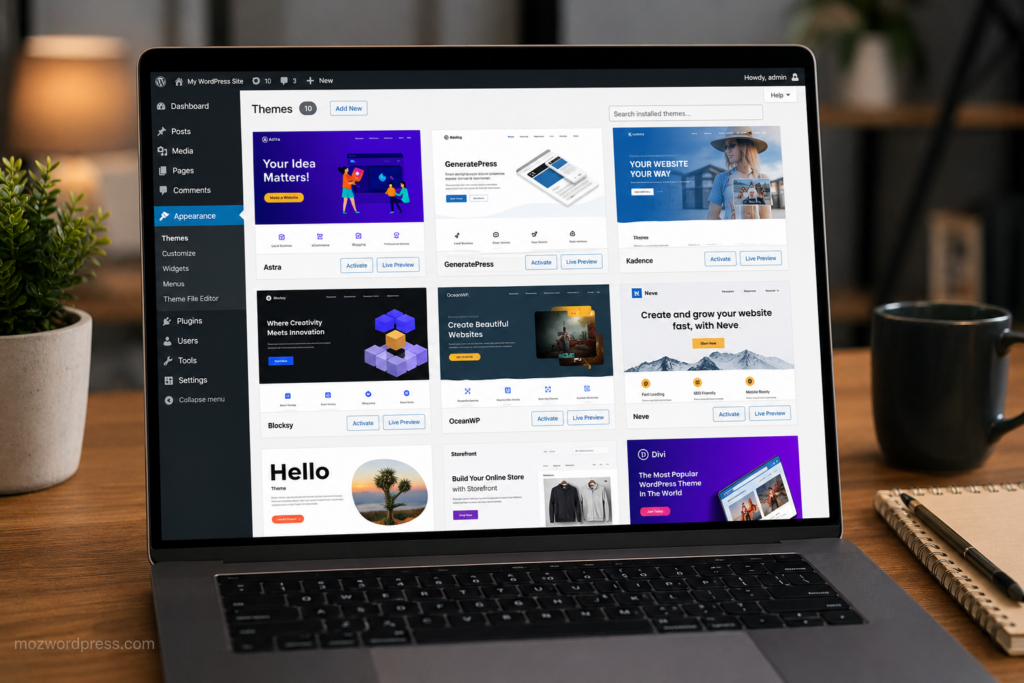
1. Astra
Astra remains one of the safest choices for almost any type of website.
It is lightweight, highly customizable, and works well with Elementor, Gutenberg, and Spectra. Even shared hosting environments usually handle Astra efficiently.
Why Astra Still Performs Well
- Loads extremely fast
- Large starter template library
- Excellent WooCommerce integration
- Strong compatibility with Rank Math SEO
- Beginner-friendly customization
Astra is especially useful for affiliate blogs, agency websites, local business sites, and digital product stores.
Internal link suggestion:
- Read our guide on improving WordPress speed with caching and image optimization.
- Learn how to configure Rank Math correctly for better indexing.
2. GeneratePress
GeneratePress is one of the best WordPress themes for users who care about performance first.
Developers love it because the codebase is clean and stable. Bloggers love it because pages load fast without requiring aggressive optimization plugins.
Best Use Cases for GeneratePress
- SEO blogs
- Niche affiliate websites
- News sites
- Documentation websites
- AdSense-focused content sites
GeneratePress paired with a caching plugin can produce excellent Core Web Vitals scores.
If you prefer long-term stability over flashy effects, this theme is hard to beat.
3. Kadence
Kadence became extremely popular because it balances performance and design flexibility better than many older themes.
Unlike heavy multipurpose themes, Kadence gives you modern design controls without slowing the site dramatically.
Why Kadence Works for Beginners
- Drag-and-drop header builder
- Global typography controls
- Fast mobile performance
- WooCommerce optimization
- Strong Gutenberg support
Kadence is ideal for creators who want professional layouts without relying heavily on Elementor.
4. Blocksy
Blocksy is one of the most modern WordPress themes available right now.
It feels built specifically for current WordPress workflows, especially block editor users.
Best Features of Blocksy
- Fast frontend performance
- Clean user interface
- Dark mode options
- Advanced header builder
- Dynamic WooCommerce features
For affiliate marketers and bloggers, Blocksy offers excellent readability and conversion-focused layouts.
5. OceanWP
OceanWP still has a strong user base because of its flexibility.
It supports many website styles and includes useful WooCommerce features out of the box.
When OceanWP Makes Sense
OceanWP is useful if you need:
- Multiple layout styles
- Deep WooCommerce customization
- Compatibility with many plugins
- Flexible design options
However, avoid installing unnecessary premium extensions if performance is a priority.
6. Neve
Neve is optimized for speed and mobile responsiveness.
It performs especially well on smaller hosting plans where lightweight themes matter more.
Why Neve Is Popular
- AMP compatibility
- Fast setup process
- Simple customization
- Lightweight structure
- Reliable updates
Neve works well for freelancers, portfolios, local businesses, and startup websites.
7. Divi
Divi remains one of the most widely used premium themes despite criticism about performance.
The visual builder is powerful, but optimization becomes essential on larger websites.
When Divi Is Worth Using
Divi is useful if:
- You want visual editing
- You build client websites
- Design flexibility matters more than raw speed
- You prefer all-in-one solutions
If you use Divi, combine it with proper caching, optimized hosting, and image compression.
8. Hello Elementor
Hello Elementor is intentionally minimal.
It is designed specifically for Elementor users who want maximum design freedom.
Important Warning About Hello Elementor
By itself, Hello Elementor is extremely barebones.
Most functionality comes from Elementor and additional plugins. If overused, this setup can become heavy.
Use it if:
- Elementor is central to your workflow
- You need custom landing pages
- You build marketing funnels
Avoid it if you want lightweight performance without extensive page builder usage.
9. Storefront
Storefront is developed by the WooCommerce team.
That alone makes it one of the safest eCommerce theme choices.
Why Storefront Is Reliable
- Excellent WooCommerce compatibility
- Stable updates
- Simple code structure
- Minimal plugin conflicts
Storefront may not look visually impressive initially, but it provides a stable foundation for online stores.
10. Sydney
Sydney is a practical theme for business websites and agencies.
It offers strong homepage layouts and professional presentation without becoming too complicated.
Best Uses for Sydney
- Corporate websites
- Freelance services
- Agencies
- Consulting businesses
- Landing pages
The free version already includes many useful features.
11. Hestia
Hestia focuses on modern one-page layouts and startup-style websites.
It is especially useful for simple service websites.
Why Users Choose Hestia
- Material design aesthetics
- Easy homepage sections
- Fast setup
- WooCommerce support
Hestia works best for smaller projects rather than large content-heavy websites.
12. Twenty Twenty-Six
The default WordPress theme should not be ignored.
Modern default themes have improved significantly in speed and accessibility.
Why Default Themes Are Better Now
- Excellent compatibility
- Minimal bloat
- Fast loading times
- Strong block editor integration
For some bloggers, a properly customized default theme may outperform many premium alternatives.
Best WordPress Themes for SEO
If SEO is your top priority, these themes consistently perform well:
- GeneratePress
- Astra
- Kadence
- Blocksy
- Neve
These themes generally produce cleaner code, faster load times, and better compatibility with optimization plugins.
You can test theme speed using:
Best WordPress Themes for Affiliate Marketing
Affiliate websites require fast layouts, readability, and strong monetization placement.
The best options include:
- Astra
- GeneratePress
- Blocksy
- Kadence
These themes work well with:
- Comparison tables
- Review plugins
- Ad placements
- Affiliate link management plugins
- Email opt-in forms
Avoid themes overloaded with animations and unnecessary scripts because they often reduce conversions.
Common Mistakes When Choosing a WordPress Theme
Installing Heavy Demo Content
Many demos include large images, sliders, and plugins that slow down real websites immediately.
Only import what you actually need.
Ignoring Mobile Performance
A theme may look excellent on desktop while performing poorly on phones.
Always test:
- Mobile menu speed
- CLS issues
- Font readability
- Touch responsiveness
Choosing Themes That Stop Receiving Updates
Outdated themes create security risks and plugin conflicts.
Check:
- Last update date
- Active installations
- Support activity
- Compatibility with recent WordPress versions
How to Safely Test a New Theme
Never change themes directly on a live website without preparation.
Recommended Safe Process
- Create a full backup
- Use a staging environment
- Test plugins carefully
- Check mobile responsiveness
- Re-test SEO settings
- Verify WooCommerce pages
- Test loading speed again
Some themes can affect schema markup, menus, widget placement, and page builder layouts unexpectedly.
Final Thoughts
The best WordPress themes are not necessarily the most visually complex ones. In most cases, lightweight themes with clean code outperform feature-heavy designs in SEO, user experience, and long-term stability.
For most users in 2026:
- Astra is the safest all-around choice
- GeneratePress is ideal for performance-focused websites
- Kadence offers the best balance between design and speed
- Blocksy feels the most modern
- Storefront remains excellent for WooCommerce
Choose a theme based on your real website goals, not just demo previews.
A fast, stable foundation will save you countless hours of troubleshooting later.
External Resource
Official WordPress Theme Directory:
https://wordpress.org/themes/

